Product Configurators: How AI Will Transform Personalised Commerce

Contents
- What is a product configurator?
- Seven product configurators worth studying
- 1. Samara Backyard: configuring a home before speaking to sales
- 2. Tesla Model 3: combining product and purchase decisions
- 3. Volvo EX30: making subtle options easy to understand
- 4. Land Rover Defender: managing a large configuration space
- 5. Cowboy Cruiser: connecting product education with customisation
- 6. Veloretti Ace Two: a focused three-step journey
- 7. Tony’s Chocolonely: personalisation for food, gifts and occasions
- Why configurators are good for businesses
- They make products easier to understand
- They can increase order value without relying on generic upsells
- They create better sales conversations
- They capture valuable demand signals
- They reduce invalid or incomplete orders
- They connect marketing with operations
- How AI will change product configuration
- Conversational guided selling
- Faster visual asset creation
- Personalised starting points
- Smarter recommendations
- Easier content and localisation
- Continuous optimisation
- Where configurators will appear next
- How we can plan and build a configurator for your product or service
- Map the decisions before designing the screens
- Design the path to the ideal state
- Turn the experience into a delivery roadmap
- What a good configurator needs
- Start with product rules, then add intelligence
- Sources and image references
For years, e-commerce has asked customers to browse a catalogue and choose the closest available product. Product configurators reverse that relationship. They let the customer shape the product around their needs, see the consequences of each decision and move forward with greater confidence.
This model is already well established in cars, homes and premium bicycles. It is also appearing in everyday products such as personalised food and gifts. As artificial intelligence makes guided recommendations, image creation and product visualisation easier to deliver, configurators will spread into many more industries.
The opportunity is bigger than adding a colour selector to a product page. A good configurator connects customer intent, product rules, visual presentation, pricing, availability and fulfilment in one guided experience.
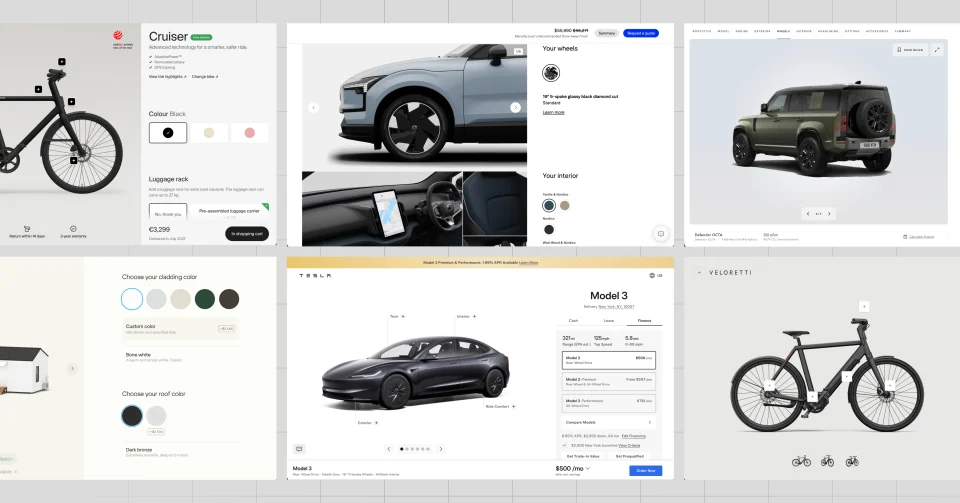
Hero image sources: Interface screenshots from the Samara, Tesla, Volvo, Land Rover, Cowboy and Veloretti configurators referenced in this article. Screenshots were captured on 2 August 2026 for editorial analysis; all product names, interfaces and imagery remain the property of their respective owners.
What is a product configurator?
A product configurator is an interactive buying tool that helps a customer assemble a valid version of a product or service. Depending on the product, it may include:
- Model, size or package selection
- Colours, materials and finishes
- Features, components and accessories
- Personalised text, imagery or artwork
- Live pricing and finance options
- Compatibility and manufacturing rules
- Delivery estimates and service availability
- A saved configuration, quote request or direct checkout
Personalisation and configuration overlap, but they are not identical. Personalisation changes a product for an individual, such as adding a name to a chocolate wrapper. Configuration combines approved options into a valid product, such as selecting the engine, wheels and interior of a vehicle. The strongest experiences can do both.
Seven product configurators worth studying
-
01 Modular homes
Samara Backyard
Customers can shape
Home model, exterior colours and finishes.
Key lesson
Make a complex, high-value product feel tangible before a sales conversation.
-
02 Automotive
Tesla Model 3
Customers can shape
Model, exterior, wheels, interior, technology and purchase options.
Key lesson
Keep the product, commercial choices and next action in one continuous journey.
-
03 Automotive
Volvo EX30
Customers can shape
Version, colour, wheels, interior and options.
Key lesson
Use detailed imagery to make subtle design choices easier to compare.
-
04 Automotive
Land Rover Defender
Customers can shape
Bodystyle, engine, exterior, wheels, interior, packs and accessories.
Key lesson
Break a large option set into a logical sequence and provide a clear summary.
-
05 Electric bicycles
Cowboy Cruiser
Customers can shape
Bike, colour and practical accessories.
Key lesson
Connect lifestyle choices with useful product information and add-ons.
-
06 Electric bicycles
Veloretti Ace Two
Customers can shape
Lite or Pro model, colour, accessories and services.
Key lesson
Start with a simple product decision, then layer on relevant extras.
-
07 Food and gifting
Tony's Chocolonely
Customers can shape
Wrapper colour, text, graphics, templates and uploaded artwork.
Key lesson
Turn a standard product into a personal, occasion-based or corporate purchase.
1. Samara Backyard: configuring a home before speaking to sales
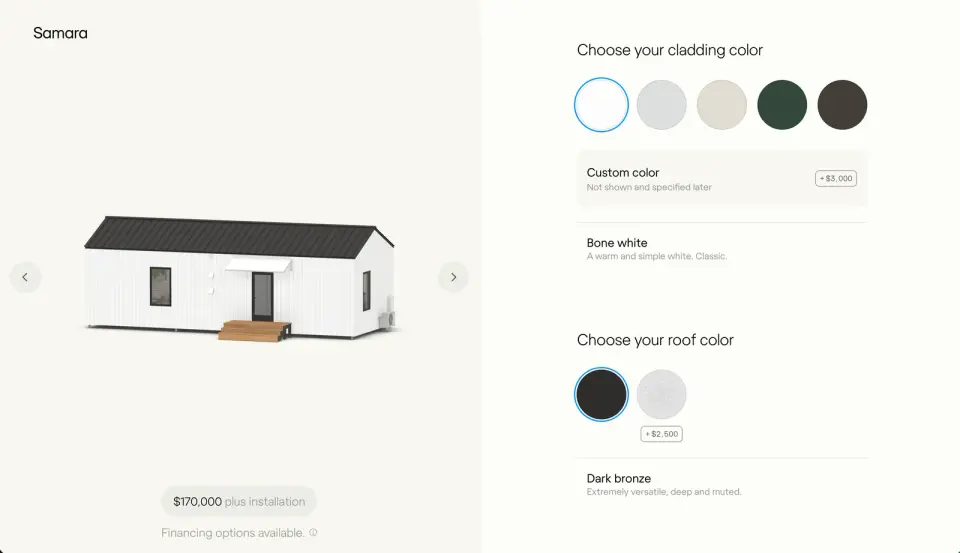
Samara’s Backyard configurator demonstrates how configuration can support a considered, high-value purchase. The customer can explore a home visually and compare choices such as cladding and roof colours while keeping the base commercial context visible.
What works well
- The building remains the visual focus while choices sit in a dedicated control panel.
- Colour and material decisions update a product that would otherwise be difficult to imagine from a specification sheet.
- The interface makes a major purchase feel more approachable before the customer enters a detailed property or sales process.
Business lesson: A configurator does not need to complete the whole sale to create value. For a home, kitchen, fit-out or commercial system, its job may be to educate the buyer and generate a better-qualified enquiry.
Important note: High-value configurators must separate the configurable product price from site-specific costs such as permits, installation, delivery or preparation. A beautiful preview should never create false price certainty.
2. Tesla Model 3: combining product and purchase decisions

Tesla’s Model 3 configurator is designed as a direct path from interest to order. Model variants, exterior and interior choices, performance information, financing and the primary action remain part of the same experience.
What works well
- A strong starting configuration prevents the customer from facing a blank canvas.
- The vehicle preview responds to meaningful options rather than decorative choices alone.
- Pricing and payment context stay close to the selected specification.
- The final action is persistent, so configuration remains connected to purchase intent.
Business lesson: A configurator is most commercially useful when every choice updates a coherent order, not just an attractive visual. Price, availability, finance and fulfilment should remain connected to the configuration.
Important note: Regional incentives, delivery dates and option availability can change. The product rules and commercial data need to be market-aware and maintained independently of the visual layer.
3. Volvo EX30: making subtle options easy to understand
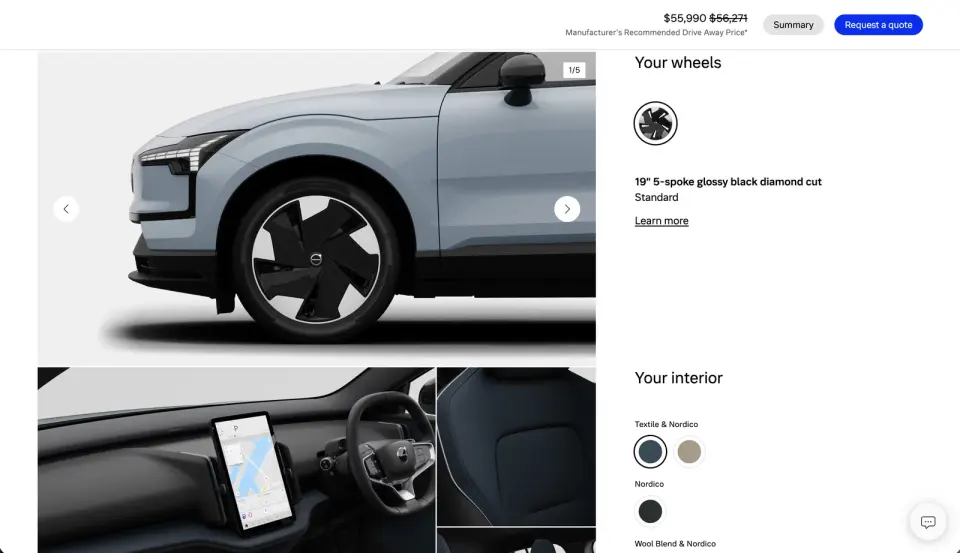
The Volvo EX30 experience gives customers detailed views of choices such as exterior colours, wheels and interior rooms. Volvo also supports a configuration summary that can bring selected options and pricing together.
What works well
- Close-up imagery makes small but emotionally important differences easier to evaluate.
- Interior, exterior and wheel options are presented as a coordinated design system.
- The customer can understand what is included and what changes the final specification.
Business lesson: Customers need the right visual scale for each decision. A full product view is useful for colour; a close-up is better for upholstery, wheels, texture or finish.
Important note: Some visual combinations may be illustrative rather than orderable. The experience should clearly distinguish inspiration from configurations that can actually be produced and delivered.
4. Land Rover Defender: managing a large configuration space
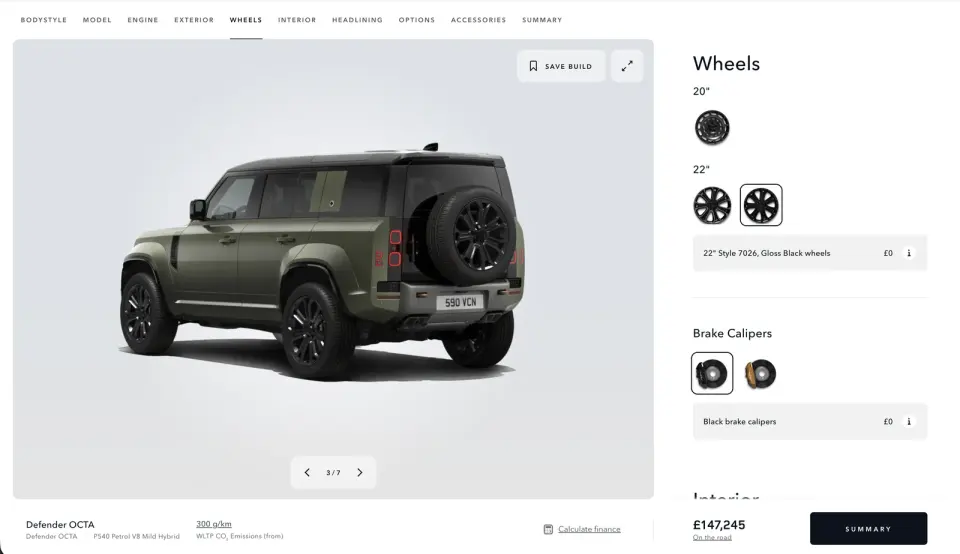
Land Rover has to manage more configuration depth than most retailers. The Defender journey covers bodystyle, model, engine, exterior, wheels, interior, headlining, options, accessories and a final summary.
What works well
- A visible step structure tells customers where they are and what remains.
- A large product preview gives immediate feedback as options change.
- Save-build functionality supports a purchase that may take several sessions or involve another person.
- Accessory packs translate many individual items into purpose-led choices.
Business lesson: Complexity should be organised around the customer’s goal, not the structure of an internal product database. “Adventure” or “urban” packages are easier to understand than a long list of component codes.
Important note: Long configurators need save, share and resume features. Without them, customers can lose significant work or avoid experimenting because they fear they cannot return to a preferred build.
5. Cowboy Cruiser: connecting product education with customisation
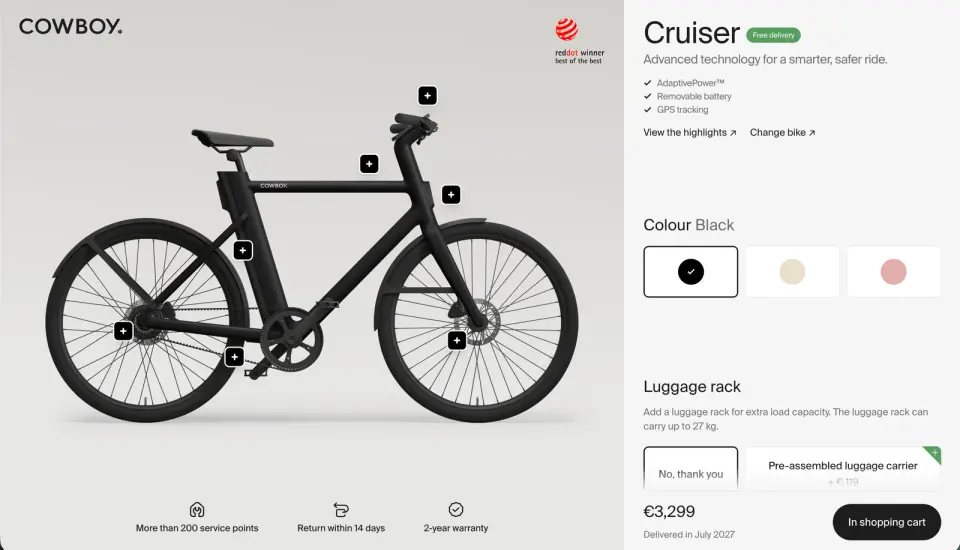
Cowboy’s configurator keeps a large bicycle image on screen while exposing colour and accessory decisions. Interactive hotspots help explain product features without forcing the customer to leave the buying journey.
What works well
- The product stays visible while the customer moves through decisions.
- Hotspots turn the configurator into both a selling and education tool.
- Accessories such as a luggage rack are shown in the context of how the bike will be used.
Business lesson: Configuration can reduce the gap between technical product detail and lifestyle value. Customers do not just choose a component; they understand why it matters to their daily use.
Important note: Interactive product scenes can become heavy on mobile devices. Image and 3D assets need progressive loading, responsive sizes and a usable fallback for slower connections.
6. Veloretti Ace Two: a focused three-step journey
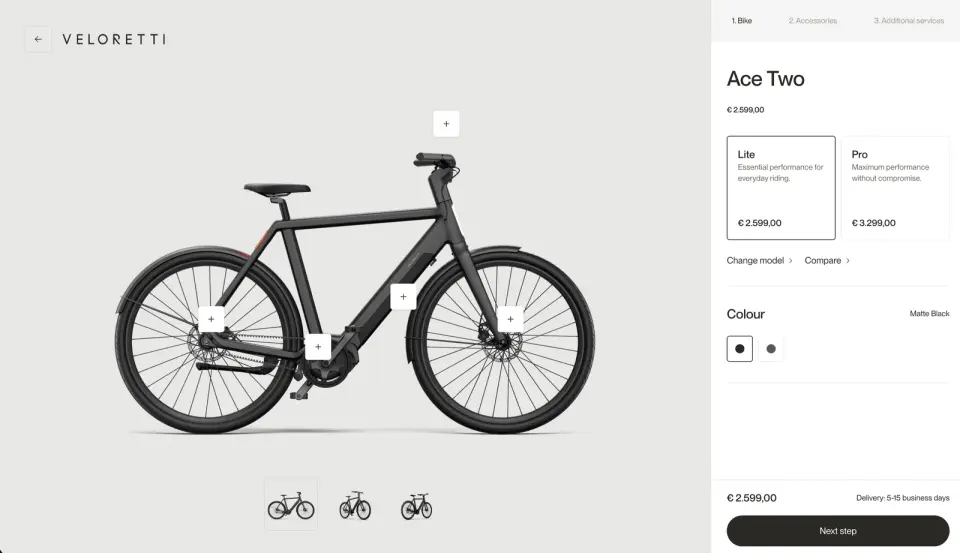
Veloretti simplifies its Ace Two journey into three stages: bike, accessories and additional services. The customer first compares Lite and Pro, selects a colour, then continues to relevant extras.
What works well
- The Lite and Pro decision is framed in plain language around everyday versus maximum performance.
- Price changes are visible at the point of choice.
- Accessories and services appear after the customer has committed to the core product.
- The main image includes product hotspots and alternative views without making the interface feel overly technical.
Business lesson: Not every configurator needs dozens of options. A short, intentional sequence can improve clarity while still creating opportunities for accessories, service plans, delivery options and care products.
Important note: Add-ons should be relevant and compatible with the selected product. A smaller set of useful recommendations is more persuasive than a generic cross-sell catalogue.
7. Tony’s Chocolonely: personalisation for food, gifts and occasions
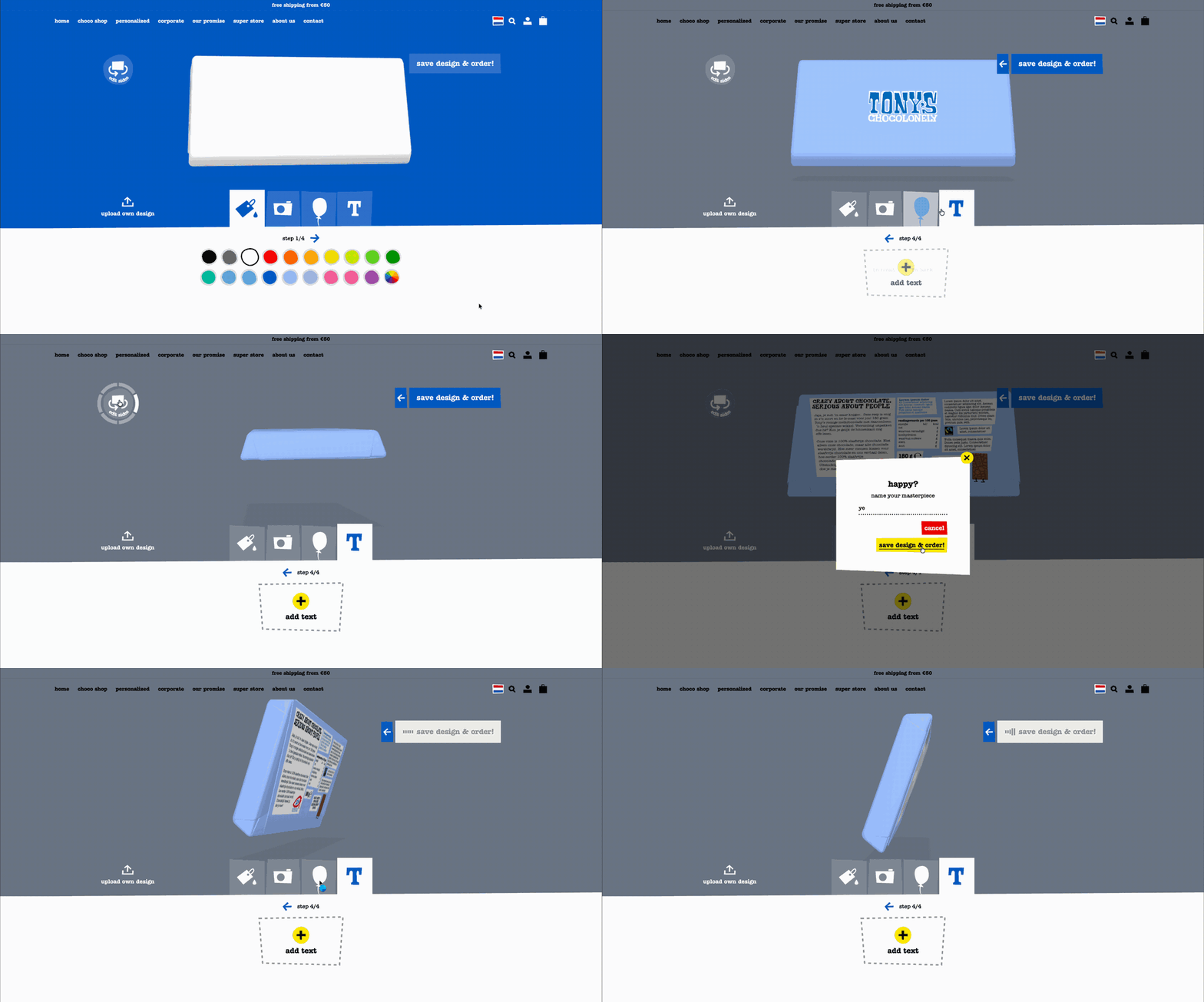
Tony’s Chocolonely shows that configurators are not limited to expensive products. Customers can personalise a wrapper using colours, graphics, text, templates or uploaded artwork, then save the design and order the finished bars.
What works well
- Personalisation gives a standard product a specific occasion and emotional purpose.
- Templates help customers begin quickly, while uploads support more original or branded designs.
- The same tool can serve birthdays, weddings, employee onboarding, campaigns and corporate gifting.
- The preview makes a print product understandable before production.
Business lesson: Personalisation can create a premium service layer around a simple product. It can also open new customer segments without requiring an entirely new core product range.
Important note: Print configurators must explain production constraints. Tony’s notes that nutritional information requires space on the wrapper, printed colours may differ from on-screen RGB previews and small alignment shifts can occur during folding.
Why configurators are good for businesses
They make products easier to understand
Customers often struggle to translate product codes, swatches and feature lists into a finished outcome. A live preview makes the relationship between a choice and its result much clearer.
They can increase order value without relying on generic upsells
Accessories, upgrades and services are more relevant when they are attached to a specific configuration. A roof rack, premium wheel, installation service or gift design becomes part of the customer’s intended outcome rather than an unrelated product recommendation.
They create better sales conversations
A saved configuration gives a sales team useful context before the first call. The customer has already expressed preferences, budget signals and intended use. This can shorten discovery and make the conversation more specific.
They capture valuable demand signals
Even when a customer does not buy, configuration behaviour can show which colours, features, packages and price points attract attention. That information can guide merchandising, product development and campaign planning when it is collected with appropriate consent and privacy controls.
They reduce invalid or incomplete orders
A rules-based configurator can prevent incompatible combinations, explain dependencies and require essential information before checkout or quote submission. This is especially valuable for manufactured products and business-to-business orders.
They connect marketing with operations
The strongest configurators connect to product information, pricing, inventory, customer relationship management, quoting and fulfilment systems. The experience becomes a usable order specification rather than a visual marketing exercise that staff must rebuild manually.
How AI will change product configuration
AI will not replace the product rules underneath a configurator. Prices, compatibility, availability, safety constraints and manufacturing logic still need reliable source systems. AI is most useful as an easier interface to those systems.
Conversational guided selling
Instead of understanding every option, a customer could explain what they need: “I commute 20 kilometres each day, carry a laptop and need low maintenance.” An AI assistant can translate that intent into a recommended starting configuration and explain the trade-offs.
Faster visual asset creation
Generative tools can help teams produce concept imagery, lifestyle scenes, material variations and supporting content for a larger number of options. Final product previews still require accurate, approved assets, especially where colour, fit or specification affects the purchase.
Personalised starting points
A configurator can begin with a relevant default based on stated use, market, budget or previous choices. This reduces the effort of starting from zero while leaving the customer in control.
Smarter recommendations
AI can recommend compatible accessories, service plans or packages based on the configuration and intended use. Recommendations should include a clear reason and should never bypass compatibility, inventory or eligibility rules.
Easier content and localisation
Product teams can use AI to draft option descriptions, comparison summaries, market-specific explanations and accessible alternative text. Human review and structured product data remain essential for accuracy.
Continuous optimisation
Teams can analyse where customers hesitate, reverse choices or abandon a journey. AI can help identify patterns and propose clearer defaults, explanations or sequence changes, which can then be tested rather than automatically published.
Where configurators will appear next
The same model can work across many verticals:
- Furniture and interiors: sofas, storage systems, kitchens, lighting and room layouts
- Fashion and jewellery: materials, sizing, engraving, colour combinations and made-to-order pieces
- Beauty and wellness: routines and product bundles based on preferences and goals
- Sport and outdoor equipment: bicycles, boards, golf equipment, camping systems and team kits
- Food and gifting: packaging, flavours, quantities, messages and corporate campaigns
- Travel and hospitality: rooms, activities, transfers and flexible experience packages
- Business-to-business equipment: machinery, components, capacity, installation and maintenance agreements
- Professional services: structured packages, deliverables, timelines and optional support
The common requirement is a product or service with meaningful choices, explainable rules and a result the customer benefits from seeing before they commit.
How we can plan and build a configurator for your product or service
We can design and build a similar configuration experience around the way your customers choose and the way your business fulfils. The goal is not to copy an automotive configurator. It is to create the shortest trustworthy path from a customer’s starting point to an ideal, valid outcome for your product or service.
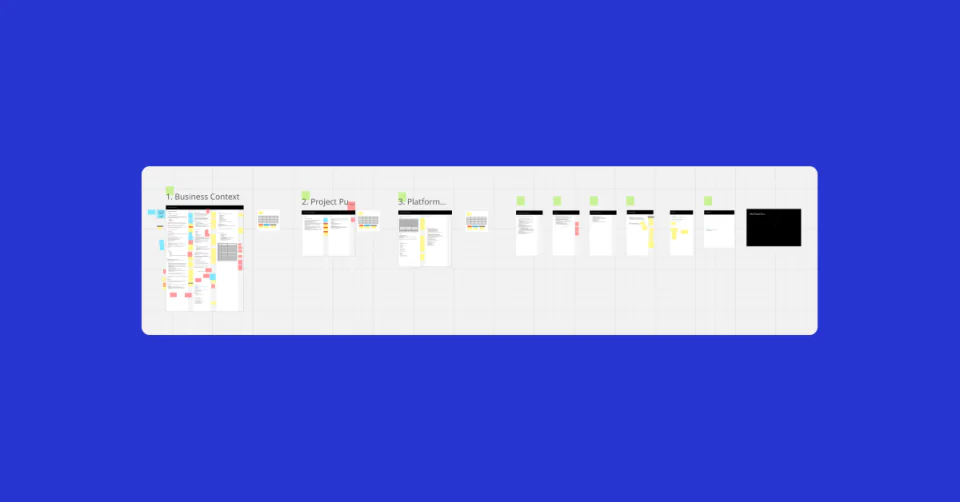
We begin by defining that ideal state. For a product, it could be a complete, compatible and available configuration ready for checkout or a quote. For a service, it could be the right package, location, appointment, team and delivery timeline. Every screen in the journey should help the customer reach that state or clearly explain why another route is more suitable.
Map the decisions before designing the screens
Together, we map the information the customer needs to provide, the choices the business needs to make and the rules that connect them. This can include:
- Inventory quantity and availability by location
- Compatible sizes, materials, components and accessories
- Budget, intended use and customer priorities
- Delivery postcode, lead time and installation requirements
- Service eligibility, capacity, appointment availability and team coverage
- Minimum order quantities, production limits and approval requirements
- Regional pricing, taxes, finance and market-specific options
- Customer type, account terms and previous purchases
The flow can then respond to real conditions. An in-stock product may continue directly to checkout. Low stock could show a delivery warning or alternative. An unavailable combination could recommend the nearest valid option. A complex or high-value build could move into a saved design, consultation or quote request without forcing the customer to repeat their decisions.
Design the path to the ideal state
We map every screen, state and handover the user needs to move through, including:
- Starting point: Identify the product, service, intended use or outcome.
- Core configuration: Collect the decisions that determine compatibility and the base price.
- Availability check: Validate stock, service capacity, region and lead time before offering dependent choices.
- Personalisation: Add colours, finishes, content, accessories or service options that are valid for the selected configuration.
- Review and correction: Show a complete summary, explain conflicts and make it easy to revise an earlier choice.
- Commercial handover: Continue to checkout, booking, quote, consultation or a sales-assisted process with the full configuration attached.
This screen map becomes a practical specification for experience design, product rules, integrations, content, analytics and development. It also identifies the exceptions that can otherwise appear late in a project, such as inventory changing during a session or one option extending the delivery date of the whole order.
Turn the experience into a delivery roadmap
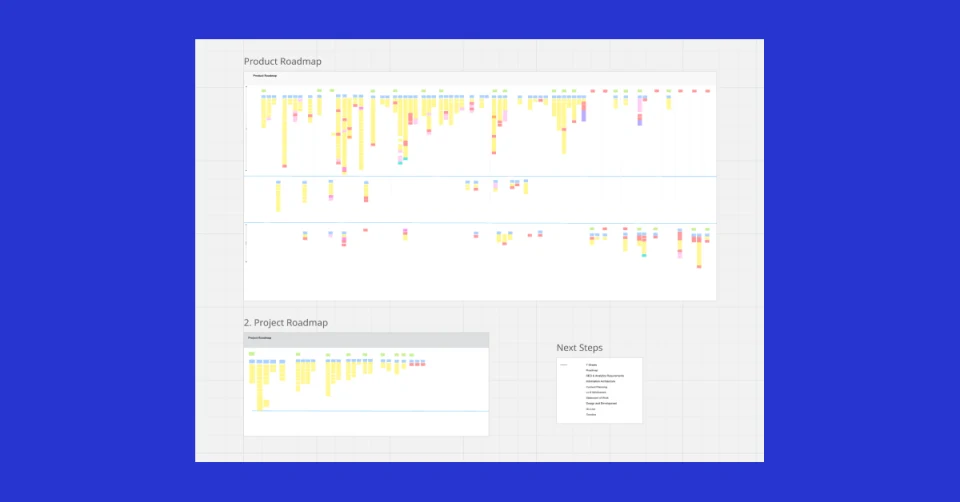
We can plan the configurator as part of our delivery roadmap session. The session turns the customer journey and product rules into prioritised features, screens, integrations, dependencies and delivery phases.
An initial release might focus on the core option model, availability rules, responsive screens and a quote or checkout handover. Later phases can add saved configurations, customer accounts, richer visualisation, AI-guided recommendations, sales tools and deeper operational automation. This keeps the first release commercially useful while creating a clear path for the more advanced experience.
The result is a shared plan showing what needs to be designed, built, connected, tested and measured—and how each part helps the customer reach a valid outcome the business can fulfil.
What a good configurator needs
Before adding AI, businesses should get the foundations right:
- A useful default: Give customers a sensible starting point rather than an empty product.
- Clear progress: Show the current step, completed decisions and what remains.
- Visible consequences: Update the preview, price, delivery and compatibility information as choices change.
- Reliable rules: Prevent invalid combinations and explain why an option is unavailable.
- Save and share: Support considered purchases, collaboration and sales handover.
- Mobile and accessible controls: Every choice should work with touch, keyboard and assistive technology.
- Strong performance: Load only the visual detail the customer needs at each stage.
- A complete summary: Present the final configuration in plain language before checkout or enquiry.
- Connected systems: Keep pricing, inventory, product data and customer records aligned.
- Useful analytics: Measure decisions and friction without collecting more personal data than necessary.
Start with product rules, then add intelligence
The most successful configurator projects do not begin with 3D or AI. They begin by defining the option model: what customers can change, which combinations are valid, how pricing works and what the business can actually fulfil.
From there, the experience can add the right level of visualisation, connect to commerce and operational systems, and introduce AI where it genuinely reduces customer effort.
Product configurators are moving from a specialist feature for automotive brands to a broader model for personalised commerce. Businesses that make complex choices feel simple, visual and trustworthy will be better positioned for a market where customers increasingly expect products to adapt to them.
If you are exploring a configurator for your business, our e-commerce, AI and automation and web development teams can help define the product rules, map the screens and integrations, and build a commercially useful experience. Start a project with us or use our delivery roadmap session to turn the idea into a practical plan.
Sources and image references
The examples and screenshots in this article were reviewed on 2 August 2026. Product options, prices, availability and interfaces may have changed since capture.